This is a part of my on-and-off explorations into Fujifilm's digital medium format G-mount protocol.
- Sniffing the Fujifilm G-mount lens-body communications
- Custom GF adapter for S35 MK Cine-zooms
- Learning from GF lens firmware updates
- Driving Fuji G lenses from DIY hardware
Fujifilm GF/GFX Firmware Updates
The recommended/easy path for updates is through the phone apps, but manually updating from a SD card is possible by holding the DISP/BACK button during power-on.
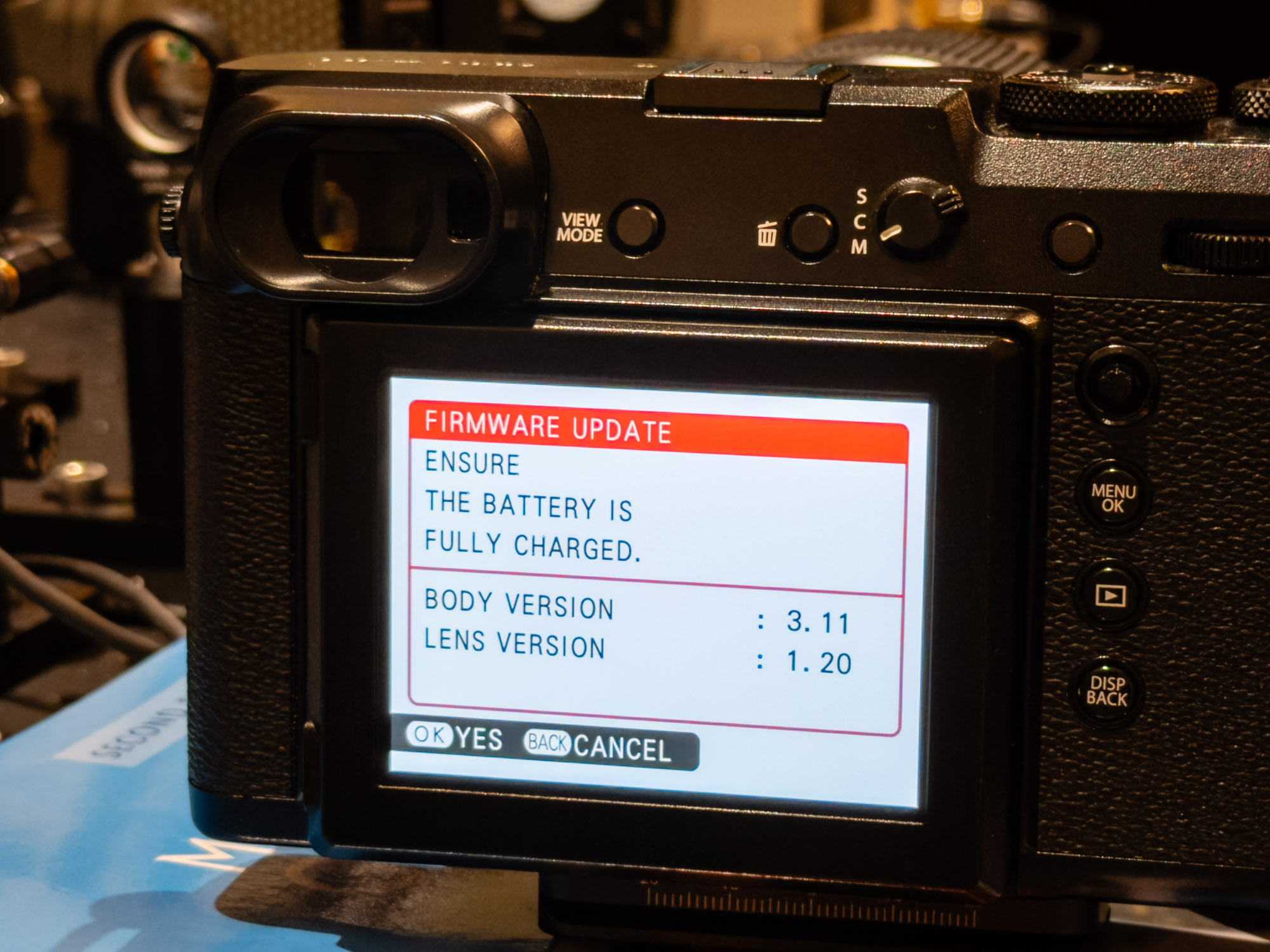
I captured the update of my GF110mm f2 with the logic analyser and a gut-feel look at the payloads suggested they're not encrypted, so let's see if we can work with the update files directly.
The low-level SPI communication between body and lens has been partially decoded in the first part of this series. Most transactions are four bytes long and have two payload bytes, a command byte, and a final tricky status/check byte which I couldn't fully understand.
Finding clues around implementation details in firmware offers a different perspective on how the hardware was designed to behave and might help unblock a more complete implementation of the protocol.
The goals of this exploration are to hopefully learn:
- What the body and lens are doing with the final byte in the packet, specifically the 5 bits from bit 1 to bit 5 which feels like a checksum,
- Functionality I can't capture with my lenses, like zoom position feedback or image-stabilisation
- If there are any fun internal packet types or debug behaviours that need to be explicitly triggered!
Acquiring the update files
I was fortunate to find a pretty comprehensive mirror of firmware updates for medium format cameras collated by Manzur Fahim on the DPreview forum with everything in one place. The Fujifilm files total about 5.2GiB with most lenses and body updates neatly organised by version with datestamps.
├── Cameras - GFX
│   ├── 01 - Fujifilm GFX 50S - 19.01.2017
│   ├── 02 - Fujifilm GFX 50R - 25.09.2018
│   ├── 03 - Fujifilm GFX 100 - 23.05.2019
│   ├── 04 - Fujifilm GFX 100S - 01.27.2021
│   ├── 05 - Fujifilm GFX 50S II - 02.09.2021
│   ├── 06 - Fujifilm GFX 100 II - 12.09.2023
│   ├── 07 - Fujifilm GFX 100S II - 16.05.2024
│   ├── 08 - Fujifilm GFX100RF - 03.20.2025
│   ├── 09 - Fujifilm GFX100 II IR - 2025.07.13
│   └── 10 - Fujifilm GFX Eterna 55 - 2025.12.11
├── GFX Major Firmware Update - The Next Chapter.mkv
└── Lenses - GF
    ├── 01 - Fujinon GF63mmF2.8 R WR - 19.01.2017
    ├── 02 - Fujinon GF32-64mmF4 R LM WR - 19.01.2017
    ├── 03 - Fujinon GF120mmF4 R LM OIS WR Macro - 19.01.2017
    ├── 04 - Fujinon GF110mmF2 R LM WR - 19.04.2017
    ├── 05 - Fujinon GF23mmF4 R LM WR - 19.04.2017
    ├── 06 - Fujinon GF45mmF2.8 R WR - 07.09.2017
    ├── 07 - Fujinon GF250mmF4 R LM OIS WR
    ├── 08 - Fujinon GF100-200mmF5.6 R LM OIS WR - 17.01.2019
    ├── 09 - Fujinon GF45-100mmF4 LM OIS WR
    ├── 10 - Fujinon GF50mmF3.5 R LM WR - 18.07.2019
    ├── 11 - Fujinon GF30mmF3.5 R WR - 30.06.2020
    ├── 12 - Fujinon GF80mmF1.7 R WR - 27.01.2021
    ├── 13 - Fujinon GF35-70mmF4.5-5.6 WR - 02.09.2021
    ├── 14 - Fujinon GF20-35mmF4 R WR - 09.09.2022
    ├── 15 - Fujinon GF55mm F1.7 R WR - 12.09.2023
    ├── 16 - Fujinon GF30mmF5.6 TS - 12.09.2023
    ├── 17 - Fujinon GF110mmF5.6 TS Macro - 12.09.2023
    ├── 18 - Fujinon GF500mmF5.6 R LM OIS WR - 16.05.2024
    └── 19 - Fujinon GF32-90mmT3.5 PZ OIS WR - 2025.09.11
The official Fuji download page is here. I'm not hosting copies of the firmware files, intermediates or Ghidra projects.
First steps
Most updates are provided as a single .DAT file, but some have two files. I normally start by looking at the file visually to quickly find strings, see how sparse it is etc. When images have consistent or repeating patterns in entropy maps it's a quick indication that some additional decoding or decryption might be required.
Visualisation of the GF45mm f2.8 1.10 firmware using 8dcc/bin-graph.
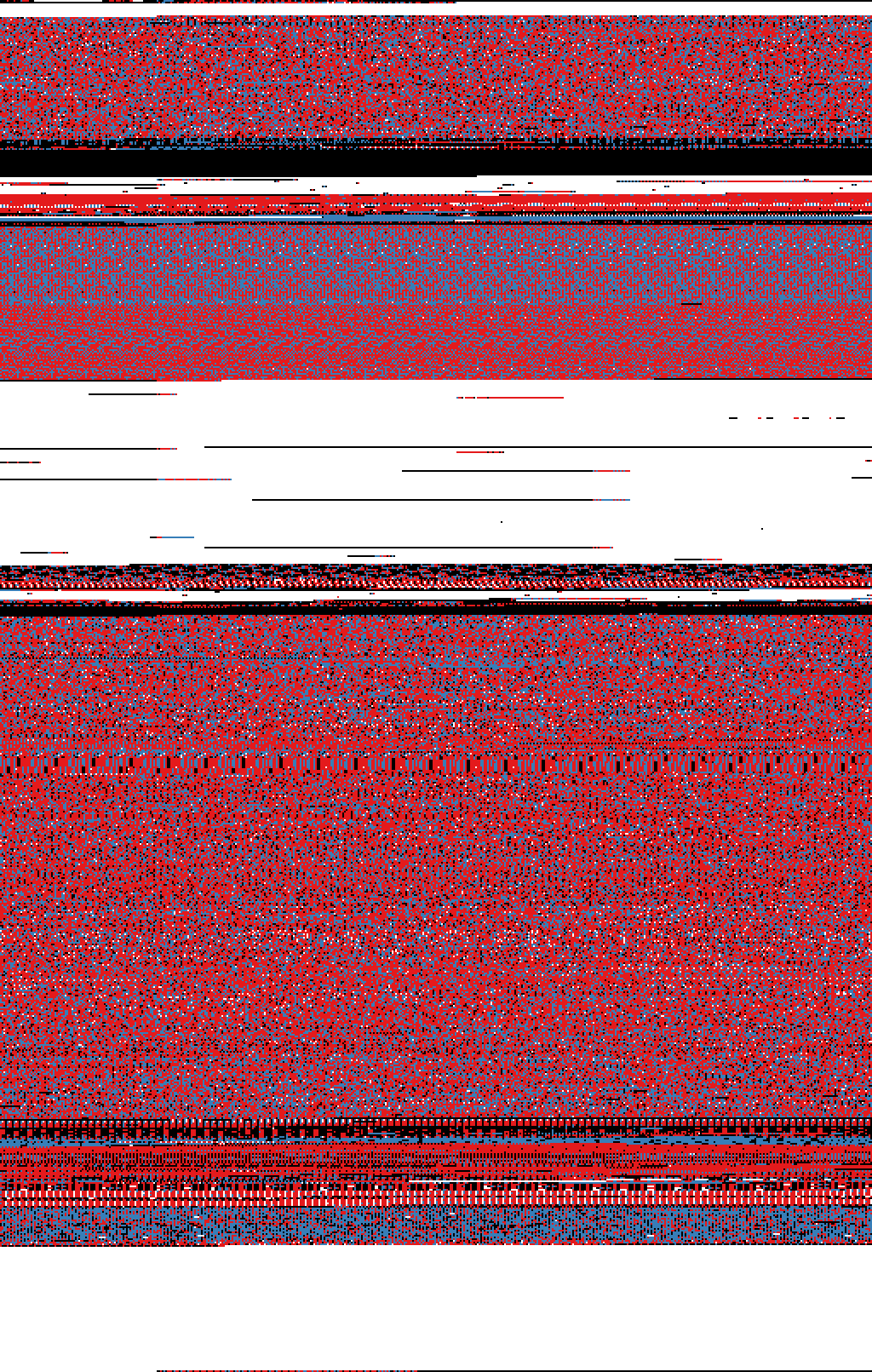
From experience I know this looks like a fairly typical firmware image, so we can start poking around with some more useful tools.
There's a 512-byte header starting with 05 00 00 00 along with ASCII data, followed by some binary data, padding and eventually firmware.
00000000: 05 00 00 00 34 63 35 32 33 31 33 30 33 36 34 31  ....4c5231303641
00000010: 33 30 33 30 33 30 33 30 33 30 33 30 33 30 33 30  3030303030303030
...
000001f0: 33 30 33 30 33 30 33 30 33 30 33 30 33 30 33 30  3030303030303030
00000200: 00 00 00 00 01 00 00 00 10 00 00 00 2c b3 f2 fa  ............,...
00000210: 04 00 00 00 ff ff ff ff ff ff ff ff ff ff ff ff  ................
00000220: ff ff ff ff ff ff ff ff ff ff ff ff ff ff ff ff  ................
00000230: ff ff ff ff ff ff ff ff ff ff ff ff 00 00 00 00  ................
00000240: 02 f2 07 00 02 f2 07 00 98 00 00 00 82 e2 ff ff  ................
00000250: ff ff ff ff 00 00 00 00 00 00 00 00 3c 00 00 00  ............<...
00000260: 4c 52 31 30 36 41 00 00 00 00 00 00 00 00 00 00  LR106A..........
00000270: 02 f0 07 00 2c b3 f2 fa 00 00 00 00 00 10 00 00  ....,...........
00000280: 00 10 00 00 00 c0 00 00 00 d0 00 00 00 e0 01 00  ................
00000290: 00 b0 02 00 00 20 00 00 00 d0 02 00 00 f0 03 00  ..... ..........
000002a0: 00 c0 06 00 00 10 01 00 00 d0 07 00 00 20 00 00  ............. ..
000002b0: 00 f0 07 00 00 10 00 00 01 00 00 00 00 00 00 00  ................
000002c0: 01 00 00 00 01 00 04 02 03 07 05 06 00 00 00 00  ................
000002d0: 00 00 08 00 02 00 00 00 00 00 00 00 00 00 00 00  ................
...
00000450: 00 00 00 00 00 00 00 00 00 00 00 00 00 04 00 20  ...............
00000460: 3d 00 00 00 11 00 00 00 19 00 00 00 80 b4 00 af  =...............
00000470: fe e7 00 bf 80 b4 00 af fe e7 00 bf 80 b4 00 af  ................
00000480: 32 b1 82 18 11 f8 01 3b 00 f8 01 3b 90 42 f9 d1  2......;...;.B..
00000490: bd 46 80 bc 70 47 00 bf 80 b5 00 af 72 b6 4f f0  .F..pG......r.O.
000004a0: 00 02 0d 4b 1a 60 4f f0 b1 02 03 f1 04 03 1a 60  ...K.`O........`
000004b0: 4f f4 fe 23 1b 88 9b b2 5b b1 08 48 08 49 09 4a  O..#....[..H.I.J
000004c0: ff f7 dc ff 08 48 09 49 09 4a ff f7 d7 ff 00 f0  .....H.I.J......
000004d0: 15 f8 08 4b 98 47 80 bd 00 20 0f 40 00 04 00 20  ...K.G... .@...
000004e0: 00 10 00 00 24 9c 00 00 24 a0 00 20 24 ac 00 00  ....$...$.. $...
000004f0: 24 01 00 00 01 d0 02 00 00 00 00 00 01 b4 02 48  $..............H
00 04 00 20 is the initial MSP / stack pointer (0x20000400), followed by reset vector, NMI vector and HardFault vector addresses.
The handler addresses are odd, which means it's THUMB code. For Cortex-M, bit 0 is the Thumb state marker and is cleared to get the actual instruction address. So the reset handler is offset by 0x3c, which would be at file offset 0x45c + 0x3c = 0x498.
Stripping the header makes the binary a bit easier to pass around to other tools.
$ dd if=GFUP0006.DAT of=GFUP0006-no-wrapper.bin bs=1 skip=$((0x45c))We can quickly extract ASCII text with $ strings -a -tx GFUP0006-no-wrapper.bin > strings.hex.txt which gives a lot of garbage output, but some entries are recognisable from the body-lens handshake captures:
2b25c FSSNW006
2b267 LR106A
2b284 0006
2b289 FUJIFILM
2b296 GF45mmF2.8 R WR
There are lots of references to lenscom and lensdc, and a lot of debug print helpers:
a23c lenscom fail
a66c lenscomtsk fail
a73c lenscom
...
53d90 volt:%d
53d9c BL:OFF
53da4 FOCUS PLS
53db0 BL:NEAR
53dbc BL:FAR
53dc4 FOCUS SPD
53dd0 spd:%05d
53ddc TRK
53de4 TRK_MOTION
53df4 CAF_MOVIE
53e00 CAF_MOTION_REC
53e14 MF_MOTION_REC
53e24 TMP:LOW
53e30 TMP:NORMAL
... and so on
We can disassemble and try and look things over, but I prefer using Ghidra from here on.
$ arm-none-eabi-objdump -D -b binary -m arm -M force-thumb --adjust-vma=0x45c GFUP0006.DAT > disasm.thumb.sI imported the stripped binary as ARM:LE:32:Cortex, enabled THUMB disassembly, and marked the reset handler at 0x3c before poking around for an hour or so.
Checksum Logic
There weren't any handy "checksum" or "CRC" strings to guide me to the answer, but I first thought the "lenscom", "lenscom fail" and "lenscomtsk fail" strings looked like a good starting point. Using Ghidra's string search and filter makes finding candidate locations really easy.
That turned out to be a dead-end, so I started to spend time looking for the typical patterns behind most checksum algorithms:
- Because we know some packets are received and sent with the same check values, there should be both encoder and decoder implementations.
- The function signatures should accept the structure/bytes and return a value, or accept a pointer for the checksum storage
- It's fairly typical[1] to see the RX path calculate the CRC and then compare it with the value in the payload then return or jump to success/fail paths.
- Most algorithms result in code with loops or clusters of bit-shifting, boolean logic and masking operations
- Polynomial constants being initialised or passed into the function can sometimes stick out
- Tables of coefficients should have high entropy
- From packet captures, I know the 0th bit of the byte was always zero, and the upper two bits are used as a sub-ID
- Thinking about how the different fields would be pulled out of an inbound byte, we'd expect to see shifting then masking, or masking and shifting for the different fields in the final byte.
- Shifts of 1 for the 5 unknown bits (or more small shifts if there's more fields) and a shift of 6 for the upper 2-bit field.
- Probably masking values of
0x1f/0x0f/0x03before or after the shift to isolate the field they want.
After looking around for a while, a fairly large section of branchy code looked responsible for dispatching to functions all over the binary. Working back up the execution tree and it seemed like it was on one of the branches out of a possible decoder function!
The disassembled view of the function smells a lot like what I was expecting, runs of masking and shift operations, error handling and edge cases, and checking of the value against itself.
  if ((*(byte *)(DAT_2000287c + 0x20) & 0x3f) >> 1 !=
      ((((*(ushort *)(DAT_2000287c + 0x22) & 0x7ff) >> 6) +
        (uint)(*(byte *)(DAT_2000287c + 0x23) >> 3) + ((*(byte *)(DAT_2000287c + 0x22) & 0x3f) >> 1)
        + ((*(uint *)(DAT_2000287c + 0x20) & 0x1ffff) >> 0xc) +
       ((*(ushort *)(DAT_2000287c + 0x20) & 0xfff) >> 7)) -
       ((int)((uint)*(byte *)(DAT_2000287c + 0x20) << 0x19) >> 0x1f) & 0x1f))
  {
    return 6;
  }
Full decompiled function for anyone who cares
undefined4 FUN_200026d4(void)
{
  undefined1 *puVar1;
  int iVar2;
  undefined4 uVar3;
  int iVar4;

  iVar4 = DAT_2000287c;
  puVar1 = DAT_20002878;
  *(undefined1 *)(DAT_2000287c + 0x23) = *DAT_20002878;
  *(undefined1 *)(iVar4 + 0x22) = puVar1[1];
  *(undefined1 *)(iVar4 + 0x21) = puVar1[2];
  *(undefined1 *)(iVar4 + 0x20) = puVar1[3];
  iVar2 = DAT_2000287c;

  if (*(int *)(iVar4 + 0x20) == DAT_20002880) {
    return 7;
  }
  if ((*(byte *)(DAT_2000287c + 0x20) & 1) != 0) {
    return 6;
  }

  if ((*(byte *)(DAT_2000287c + 0x20) & 0x3f) >> 1 !=
      ((((*(ushort *)(DAT_2000287c + 0x22) & 0x7ff) >> 6) +
        (uint)(*(byte *)(DAT_2000287c + 0x23) >> 3) + ((*(byte *)(DAT_2000287c + 0x22) & 0x3f) >> 1)
        + ((*(uint *)(DAT_2000287c + 0x20) & 0x1ffff) >> 0xc) +
       ((*(ushort *)(DAT_2000287c + 0x20) & 0xfff) >> 7)) -
       ((int)((uint)*(byte *)(DAT_2000287c + 0x20) << 0x19) >> 0x1f) & 0x1f)) {
    return 6;
  }

  if (-1 < *(char *)(DAT_2000287c + 0x21)) {
    if ((*(ushort *)(DAT_2000287c + 0x20) & 0x7fff) >> 6 == 0xf) {
      uVar3 = 7;
    }
    else {
      uVar3 = 6;
    }
    return uVar3;
  }

  if ((*(byte *)(DAT_2000287c + 0x23) & 0xf8) != 8) {
    return 6;
  }
  if ((*(byte *)(DAT_2000287c + 0x22) & 1) != 0) {
    return 7;
  }
  if ((*(byte *)(DAT_2000287c + 0x22) & 2) != 0) {
    return 7;
  }
  if ((*(byte *)(DAT_2000287c + 0x22) & 4) != 0) {
    return 7;
  }
  if ((*(byte *)(DAT_2000287c + 0x22) & 8) != 0) {
    return 7;
  }

  if ((*(int *)(DAT_2000287c + 0x14) == 0) || (*(int *)(DAT_2000287c + 0x14) == DAT_20002880)) {
LAB_20002858:
    iVar4 = *(int *)(DAT_2000287c + 0x1c);
  }
  else {
    if ((*(ushort *)(DAT_2000287c + 0x20) & 0x7fff) >> 6 !=
        (*(ushort *)(DAT_2000287c + 0x14) & 0x7fff) >> 6) {
      return 6;
    }

    if (((*(byte *)(DAT_2000287c + 0x22) & 0x10) != 0) ||
       (*(uint *)(DAT_2000287c + 0x68) != (*(byte *)(DAT_2000287c + 0x1b) & 7))) goto LAB_20002858;
    if (*(code **)(DAT_2000287c + 0x2c) != (code *)0x0) {
      iVar4 = (**(code **)(DAT_2000287c + 0x2c))(*(undefined4 *)(DAT_2000287c + 0x28));
      *(uint *)(iVar2 + 0x68) = *(int *)(iVar2 + 0x68) + 1U & 7;
      if (*(int *)(iVar2 + 0x1c) == 0) {
        if (iVar4 == 0) {
          return 0;
        }
        return 5;
      }
      goto LAB_20002802;
    }
    *(uint *)(DAT_2000287c + 0x68) = *(int *)(DAT_2000287c + 0x68) + 1U & 7;
    iVar4 = *(int *)(iVar2 + 0x1c);
  }
  if (iVar4 == 0) {
    return 0;
  }
LAB_20002802:
  if (*(int *)(DAT_2000287c + 0xc) != 0) {
    return 0;
  }
  return 5;
}
A few hours deep at that point, I decided to try outsourcing my brainstem to GPT5.5 (thread) which summarised the main logic as a sum of 5-bit chunks with a handful of extra steps. I've been pleasantly surprised how recent models are better than a coin flip for these kinds of constrained 'translation' tasks.
if (w == DAT_20002880)
    return 7;              // special/sentinel value

if (w & 1)
    return 6;              // bit 0 must be zero

uint32_t sum =
    ((w >> 27) & 0x1f) +
    ((w >> 22) & 0x1f) +
    ((w >> 17) & 0x1f) +
    ((w >> 12) & 0x1f) +
    ((w >>  7) & 0x1f);

uint32_t encoded_sum = ((w >> 1) & 0x1f) + (((w >> 6) & 1) ? 31 : 0);

if (encoded_sum != sum)
    return 6;              // checksum / consistency failure
I tested a slightly more ergonomic implementation of this idea against all of the captured packets with 100% success. First goal achieved!
Interesting strings & tables
There's a handful of other human-readable strings and tables that provide some extra hints for future exploration.
lenscom
This area of the binary seems to be how the lens-body communication protocol is handled. There are tables of pointers that look like dispatch maps.
They're formatted as (command, flag) byte pairs
c0 00 c8 00 c9 00 ff 00 10 01 11 01 ... 88 01 89 01 00 00
followed by 8-byte dispatch entries. A few decoded rows from the GF45mm:
| Command | Flag | Pointer | Aux | Decoded target | |
|---|---|---|---|---|---|
0xc0 | 0x00 | 0x000000c5 | 0x000000c7 | 0x200000c4 | pointer/data |
0xc8 | 0x00 | 0x00000050 | 0x000000cd | 0x20000050 | pointer/data |
0xff | 0x00 | 0x0002fe75 | 0x00000000 | 0x2002fc14 | handler |
0x10 | 0x01 | 0x0002fe05 | 0x00000000 | 0x2002fba4 | handler |
0x15 | 0x01 | 0x00030f0d | 0x00000000 | 0x20030cac | handler |
0x61 | 0x01 | 0x0002fe05 | 0x00000000 | 0x2002fba4 | handler |
Common commands across the firmware files map a handful of the packets I've narrowed down from logic captures:
0x10–0x1a0x20–0x250x50–0x570x60,0x610x80–0x890xc0,0xc8,0xc9,0xff
But there are also some entries which I've not seen in captures,
0x58/0x59appear on some of the newer lenses like GF250, GF100-200, GF45-100, GF80, GF500, GF32-90 PZ.0x61appears in every lens, but varies between having a handler, table or a null-stub entry0x73/0x74/0x75only show up in the GF32-90mm PZ cine lens firmware
lensdc
There are hints of a text command interface in firmware,
53898 hello
538a0
538a8 r %s %08x
538b4 all off
538c0 all on
538c8 RecTiming monitor = %d
538e0 IntrBusy monitor = %d
538f8 zoom move monitor = %d
53910 iris move monitor = %d
53928 focus move monitor = %d
53944 hello
5394c usage: mdump addr       size
5396c        mdump 0x00000000 32
53988 bad RAM addr.
53998 Addr:%s  Size:%s
539ac bad Dump size.
539bd %08X
539c4 %02X
...
53b40 turn off ASSERT switch.
53b58 mdump
53b60 Memory Dump. (mdump addr size)
53b84 Peripheral Register Write.
53ba0 Peripheral Register Read.
53bbc wait
53bc4 help
53bcc this help.
53bd8 nop.
53cdc FOCUS SPD CHG
53cec spd:%05d
53cf8 IRIS  move
53d04 OFF
...
I couldn't find any code-paths in firmware for these to work over the lens mount, my guess is an internal UART, debug header or it's intended to run over a semi-hosting interface. I'd be interested if anyone has torn down a GF lens and looked at PCB test-points.
imgstabi
I don't have any lenses with image-stabilisation, so I poked around the GF250mm f4 and found some debug strings (translations via Google Translate):
imgstabi

手ブレスルー画開始
  camera-shake / through-image start

手ブレ補正S1AE開始 / 終了
  shake correction S1AE start / end

手ブレ補正S1AF開始 / 終了
  shake correction S1AF start / end

手ブレ補正S1LOCK開始 / 終了
  shake correction S1LOCK start / end

手ブレ補正S2露光開始 / 終了
  shake correction S2 exposure start / end

手ブレ補正S2動画開始 / 終了
  shake correction S2 movie start / end
These 6 modes have come up in other firmware files around autofocus referenced just with S1 level AE/AF/LOCK.
Calibration/config fields
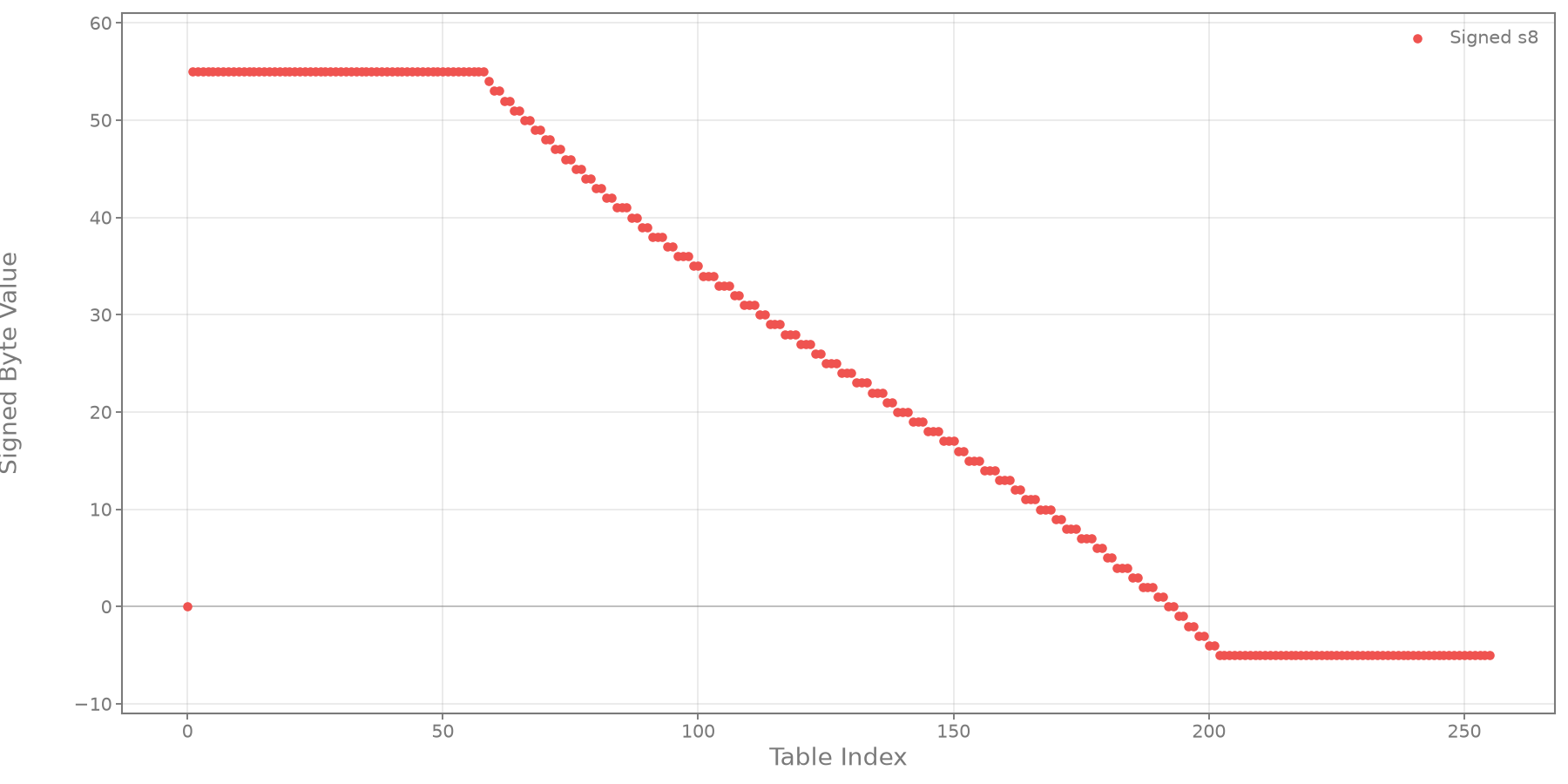
There are a pair of 4KiB sections which stand out a bit. The firmware appears to look for a value of 0xaa55 at 0x200016a8 before looking at these, so my gut feel is these may be default or fallback calibration values rather than the actual tables for the lenses.
The first block, 0x2b000..0x2bfff fields:
| Offset within block | Content |
|---|---|
0x0000..0x027f | 20*8 word table, could be calibration data? |
0x0280..0x03c7 | Word table or curve |
0x0450..0x056f | Identity fields |
0x0560..0x065f | Byte curve, plotted below |
| later regions | Sparse config with zeros and 0xff |
The second block at 0x2c000..0x2cfff has a different layout:
| Offset within block | Content |
|---|---|
0x0000..0x010f | Mostly 0xff |
0x0110..0x0240 | Several signed 16-bit descending curves |
0x0400..0x0520 | Dense values |
0x0630..0x0710 | ? |
0x0720..0x0930 | Repeating structures |
0x0960..0x0a90 | ? |
| later regions | mostly zero |
These curves aren't linear, and the range of values closely matches the ranges that the focus motor was seen working in. My guess is these tables might be used for small corrections to the lens behaviours.
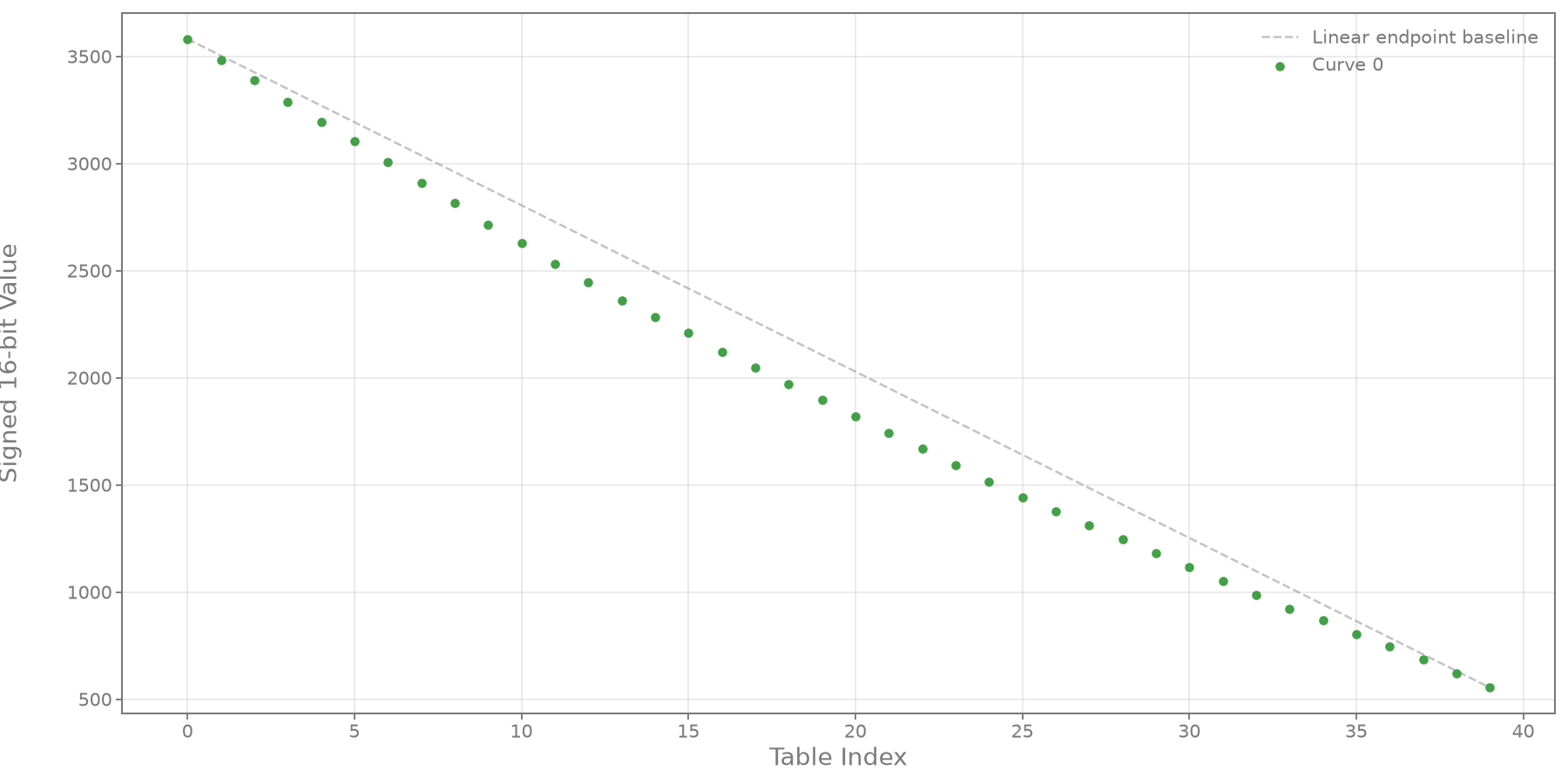
There's also a good chance some of these fields could be used by the body as optical distortions and vignetting correction are automatically applied by the body, but I've never caught them being sent over the lens-mount interface. Most lenses have similar curves, some lenses have flatter or steeper responses, and the cinema zoom GF32-90mm T3.5PZ has even some far stronger shapes
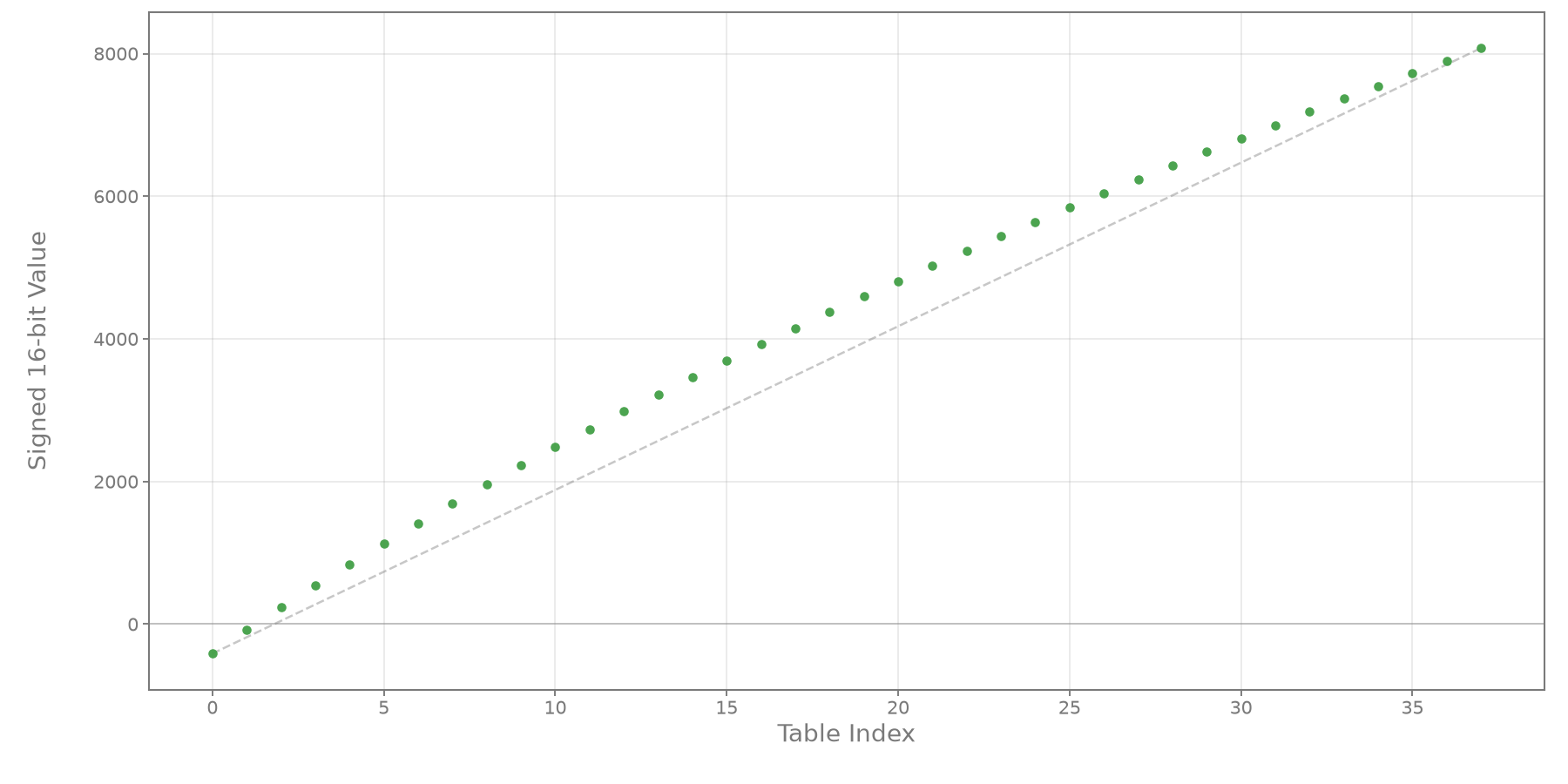
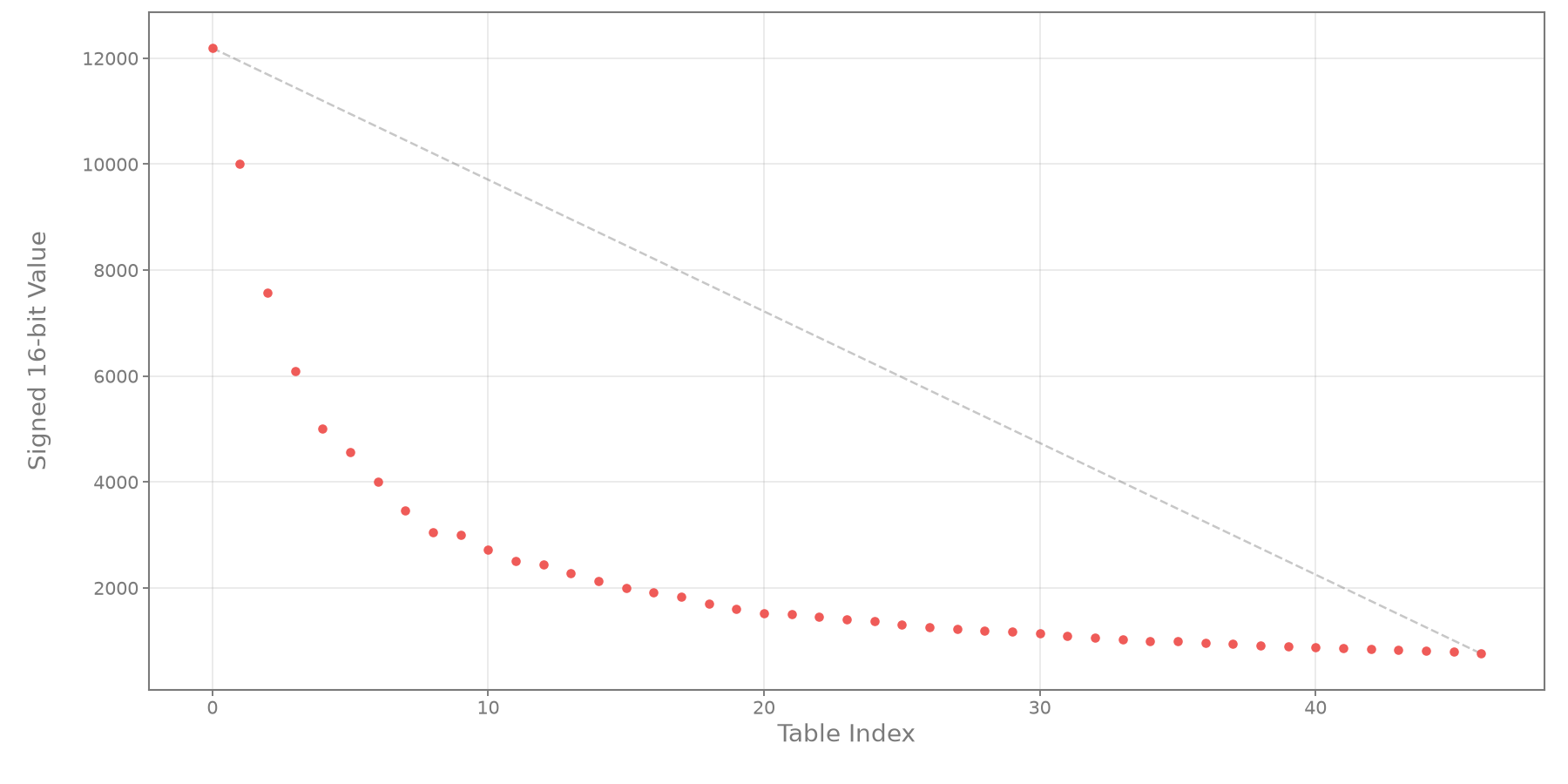
Beyond being slightly interesting I have no idea what these are actually used for at this stage.
Lens Identification Strings
I went through each firmware file and built a table of their internal model number strings. When I was originally poking around the protocol communication captures I couldn't find any references to those string fragments online so maybe this will be useful for someone.
The numbers map mostly to the release order, and the model string roughly maps as:
FSS= prime,Z= zoomN= non-OIS,G= OISW= ?,F= no aperture control ring?- Lens ID?
A few lenses haven't received firmware updates yet and I don't have access to capture their handshake.
| Lens | Model | Tag | |
|---|---|---|---|
GF63mmF2.8 R WR | LR101A | FSSNW001 | 0001 |
GF32-64mmF4 R LM WR | LR102A | FSZNW002 | 0002, 0018 |
GF120mmF4 R LM OIS WR Macro | LR103A | FSSGW503 | 0003 |
GF110mmF2 R LM WR | LR104A | FSSNW104 | 0004, 0019 |
GF23mmF4 R LM WR | LR105A | FSSNW005 | 0005 |
GF45mmF2.8 R WR | LR106A | FSSNW006 | 0006 |
GF250mmF4 R LM OIS WR | LR107A | FSSGW507 | 0007 |
GF100-200mmF5.6 R LM OIS WR | LR108A | FSZGW508 | 0008 |
GF45-100mmF4 R LM OIS WR | LR109A | FSZGW109 | 0009 |
GF50mmF3.5 R LM WR | LR110A | FSSNW010 | 0010, 0016 |
GF30mmF3.5 R WR | - | - | - |
GF80mmF1.7 R WR | LR112A | FSSNW012 | 0012, 0015 |
GF35-70mmF4.5-5.6 WR | LR114A | FSZNF013 | 0013, 0014 |
GF20-35mmF4 R WR | - | - | - |
GF55mmF1.7 R WR | LR115A | FSSNW015 | 0024 |
GF30mmF5.6 TS | - | - | - |
GF110mmF5.6 TS Macro | - | - | - |
GF500mmF5.6 R LM OIS WR | LR119A | FSSGW517 | 0029 |
GF32-90mmT3.5 PZ OIS WR | LR120A | FSZGW119 | 0030 |
GF1.4X TC WR | LA630A | FST14001 |
The GF1.4X teleconverter fields were found in the GF250mm F4 firmware near a GF250mmF4 R LM OIS WR + 1.4x string.
Fuji states compatibility with
GF100-200mmF5.6 R LM OIS WR,GF250mmF4 R LM OIS WRandGF500mmF5.6 R LM OIS WR. These lenses all had teleconverter strings in firmware.All other lenses are phrased as "Not compatible".
I'm half expecting that if I try to make some odd optical solution interact with the body that I'll have to re-use one of these to get the right aperture mappings to work.
Conclusion
Finding the checksum algorithm now allows me to implement a packet encoder as well as being able to detect errors on inbound packets. I feel like I'm now at the point where I could communicate with a lens.
Some implementations intentionally reflect the CRC onto the value and check for a null or known result instead, so this isn't always obvious. ↩